
Skip to content
Search
  • HOME
  • about
  • Services
  • Blog
  • HOME
  • about
  • Services
  • Blog
CONTACT US

Don’t Get Tripped Up by Timestamps!

More than one legal case has boiled down to an examination of the timestamps of files on a device such as a laptop or mobile phone. At Lucid Truth Technologies, we want our emails and blog posts to contain concise insights that can make or break a case for you. Timestamp analysis is a perfect example. Proper analysis can determine if a file was copied, moved, or created new. Improper analysis can result in the wrong legal decisions being made, with potentially life-altering consequences.

At first glance, timestamps seem very straightforward. When you look at the Windows File Explorer, you will see the "Last Modified Date," which is the timestamp of when the file was modified, right?... Well, not always. As it turns out, most filesystems track four separate file timestamps. These are:

  • Last modification time of the file data ("Modified timestamp")
  • Last access time of the file data ("Assessed timestamp")
  • File record metadata last changed ("Changed timestamp")
  • The time that the file was created ("Born timestamp")

Forensic analysts may refer to these as the "MACB" timestamps, which is an acronym for "Modified, Accessed, Changed, and Born." The Changed timestamp deserves an explanation since it differs from the others. The filesystem keeps a record of the files on the volume, much like a card catalog in a library used to keep a record of the books on a library shelf. Moving a file from one directory to another would typically update the Changed timestamp.

In short, it is very important to test how the filesystem sets these four timestamps by replicating the conditions at stake in the case. Here are various factors and important considerations to keep in mind:

  • Different versions of the Windows Operating System treat file timestamps differently for different actions. (See Figure 1, below.)
  • Different filesystems (FAT, exFAT, NTFS, APFS, EXT4, etc.) all behave differently and have different precision when it comes to the MACB timestamps.
  • Operations such as Copy and Paste in Microsoft Windows impact the timestamps differently than moving a file via the command line.
  • The Accessed timestamp is not always updated by various software when the file is read.
  • Various software tools, utilities, and malware can modify all four timestamps to contain arbitrary data.

Various forensic analysts have published blog postings that contain their findings under certain conditions. Figure 1 contains an example as published by the SANS Institute [1]. But even this poster contains the following caution:

Windows timestamp updates are notoriously dependent on the operating system version and a very specific combination of actions. These charts illustrate the differences between Windows 10 v1903 and Windows 11 v22H2. Use these rules as heuristics indicating common actions, but always perform testing of specific actions on specific OS versions when working with critical evidence.
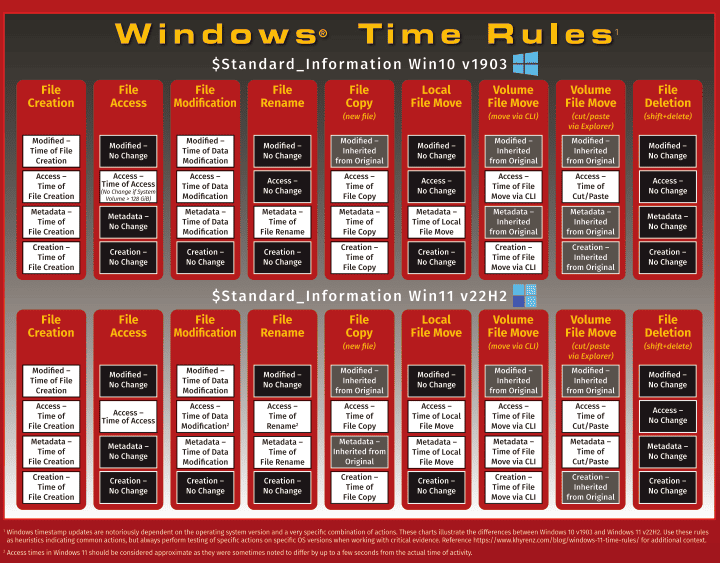
Windows Timestamp Rules Graphic

Figure 1: Windows Time Rules chart from the SANS Windows Forensic Analysis Poster

Hopefully, by now, you are convinced of the importance of investing in testing any file timestamps that are crucial to your case by replicating the device software and configurations.



[1] https://www.sans.org/posters/windows-forensic-analysis/

MORE POSTS

Digital illustration for blog post “Torrential Downpour and BitTorrent Evidence – A Forensic Perspective on P2P Investigations.” The image shows a white cloud with the BitTorrent logo raining digital raindrops onto a laptop displaying a forensic badge icon, set against a blue background with network node patterns. Represents Torrential Downpour BitTorrent evidence, P2P forensics, and digital investigation concepts for Lucid Truth Technologies.
Network Forensics

Torrential Downpour and BitTorrent Evidence – A Forensic Perspective on P2P Investigations

Read More »
November 10, 2025
A digital illustration in blue tones depicting the intersection of technology and law. A laptop on the left displays lines of network data and IP addresses. Behind it, an abstract eye icon represents surveillance, and faint IP addresses are scattered across the background. On the right side, legal symbols including a gavel, courthouse, and official document icon appear subtly. The main title reads “SUBPOENAS, PEN REGISTERS, AND IP ADDRESS LOOKUPS.”
Network Forensics

Subpoenas, Pen Registers, and IP Address Lookups

Read More »
October 20, 2025
A split-panel illustration shows the contrast between a defense attorney and a forensic expert. On the left, the defense attorney in a navy suit speaks confidently at a courtroom podium, symbolizing advocacy and due process. On the right, the forensic expert in a white lab coat examines a smartphone and works at a computer displaying a digital fingerprint, symbolizing impartial technical analysis. Between them, Lady Justice appears blindfolded and holding balanced scales, representing fairness. The background subtly blends courtroom and laboratory settings, with neutral tones of navy, gray, and white.
Legal Strategy

Defending Criminals: Are Defense Attorneys, Investigators, and Experts Working for the Dark Side?

Read More »
September 29, 2025
Load More ...
Digital illustration for blog post “Torrential Downpour and BitTorrent Evidence – A Forensic Perspective on P2P Investigations.” The image shows a white cloud with the BitTorrent logo raining digital raindrops onto a laptop displaying a forensic badge icon, set against a blue background with network node patterns. Represents Torrential Downpour BitTorrent evidence, P2P forensics, and digital investigation concepts for Lucid Truth Technologies.
Network Forensics

Torrential Downpour and BitTorrent Evidence – A Forensic Perspective on P2P Investigations

Read More »
November 10, 2025
A digital illustration in blue tones depicting the intersection of technology and law. A laptop on the left displays lines of network data and IP addresses. Behind it, an abstract eye icon represents surveillance, and faint IP addresses are scattered across the background. On the right side, legal symbols including a gavel, courthouse, and official document icon appear subtly. The main title reads “SUBPOENAS, PEN REGISTERS, AND IP ADDRESS LOOKUPS.”
Network Forensics

Subpoenas, Pen Registers, and IP Address Lookups

Read More »
October 20, 2025
Load More ...
Digital illustration for blog post “Torrential Downpour and BitTorrent Evidence – A Forensic Perspective on P2P Investigations.” The image shows a white cloud with the BitTorrent logo raining digital raindrops onto a laptop displaying a forensic badge icon, set against a blue background with network node patterns. Represents Torrential Downpour BitTorrent evidence, P2P forensics, and digital investigation concepts for Lucid Truth Technologies.
Network Forensics

Torrential Downpour and BitTorrent Evidence – A Forensic Perspective on P2P Investigations

Read More »
November 10, 2025
A digital illustration in blue tones depicting the intersection of technology and law. A laptop on the left displays lines of network data and IP addresses. Behind it, an abstract eye icon represents surveillance, and faint IP addresses are scattered across the background. On the right side, legal symbols including a gavel, courthouse, and official document icon appear subtly. The main title reads “SUBPOENAS, PEN REGISTERS, AND IP ADDRESS LOOKUPS.”
Network Forensics

Subpoenas, Pen Registers, and IP Address Lookups

Read More »
October 20, 2025
Load More ...

our services

Background Checks and Open-Source Intelligence Gathering

Mobile Forensics

Cloud Forensics

Computer Forensics

Lucid Truth Technologies is a registered trademark of Kenneth G. Hartman Consulting, LLC
©2025. Lucid Truth Technologies.
Privacy Policy
Scroll to Top

Subscribe